| DSM Specifications |
|---|
| Storage Management | Maximum Single Volume Size | - 1 PB (64 GB memory required, for RAID 6 groups only)
- 200 TB (32 GB memory required)
- 108 TB
|
|---|
| Maximum Internal Volume Number | 256 |
| SSD Read/Write Cache (Determining cache size) | Yes |
| SSD TRIM | Yes |
| RAID Group | Yes |
| Supported RAID Type | - RAID F1
- Basic
- JBOD
- RAID 0
- RAID 1
- RAID 5
- RAID 6
- RAID 10
|
| RAID Migration | - Basic to RAID 1
- Basic to RAID 5
- RAID 1 to RAID 5
- RAID 5 to RAID 6
|
| Volume Expansion with Larger HDDs | - RAID F1
- RAID 1
- RAID 5
- RAID 6
- RAID 10
|
| Volume Expansion by Adding a HDD | |
| Global Hot Spare Supported RAID Type | - RAID F1
- RAID 1
- RAID 5
- RAID 6
- RAID 10
|
| Notes | - Usable capacity for each volume will be lower than the maximum volume size and is dependent on the filesystem and the amount of system metadata stored.
- When Peta Volume is enabled, validated services and packages are required. Please refer to this article for more information on limitations.
- Actual maximum storage pool and volume sizes depend on drive sizes used, the number of drive bays available, and the RAID configuration.
- Volumes over 108 TB require 32 GB of memory or more.
|
| File System | Internal Drives | |
|---|
| External Drives | - Btrfs
- ext4
- ext3
- FAT
- NTFS
- HFS+
- exFAT
|
| Notes | exFAT Access can be installed for free from Package Center in DSM 7.0. In DSM 6.2 or earlier versions, exFAT Access needs to be purchased in Package Center. |
| File Services | File Protocol | |
|---|
| Maximum Concurrent SMB/AFP/FTP Connections | 4,000 |
| Maximum Concurrent SMB/AFP/FTP Connections (with RAM expansion) | 10,000 |
| Windows Access Control List (ACL) Integration | Yes |
| NFS Kerberos Authentication | Yes |
| Notes | - Regarding data concerning tests with RAM expansion, all memory slots are installed with the maximum capacity of supported RAM.
- During testing, the maximum number of SSDs supported by this model is installed in a RAID 5 configuration.
- The testing standard was based on the maximum number of concurrent connections supported by this model. During the testing, 25% of the connections were used to transfer files concurrently. The transfer process guaranteed that the connections were not interrupted; the minimum transfer speed was not guaranteed.
|
| Account & Shared Folder | Maximum Local User Accounts | 16,000 |
|---|
| Maximum Local Groups | 512 |
| Maximum Shared Folder | 512 |
| Maximum Shared Folder Sync Tasks | 32 |
| Hybrid Share | Hybrid Share Folder Number | 15 |
|---|
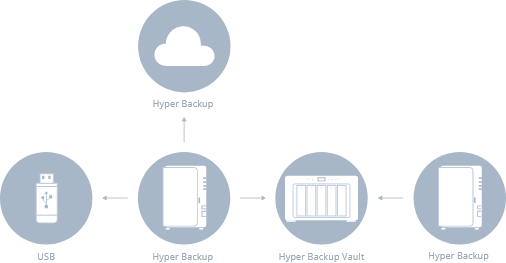
| Hyper Backup | Data & Folder Backup | Yes |
|---|
| Entire System Backup | Yes |
| Notes | Full-system backup requires DSM 7.2 or later. |
| High Availability | Synology High Availability | Yes |
|---|
| Log Center | Syslog Events per Second | 3,000 |
|---|
| Virtualization | VMware ESXi 6.5 and VAAI | Yes |
|---|
| Windows Server 2016 | Yes |
| Windows Server 2019 | Yes |
| Windows Server 2022 | Yes |
| Citrix Ready | Yes |
| OpenStack | Yes |
| General Specifications | Supported Protocols | SMB1 (CIFS), SMB2, SMB3, NFSv3, NFSv4, NFSv4.1, NFS Kerberized sessions, iSCSI, Fibre Channel, HTTP, HTTPs, FTP, SNMP, LDAP, CalDAV |
|---|
| Supported Browsers | |
| Supported Language | English, Deutsch, Français, Italiano, Español, Dansk, Norsk, Svenska, Nederlands, Русский, Polski, Magyar, Português do Brasil, Português Europeu, Türkçe, Český, ภาษาไทย, 日本語, 한국어, 繁體中文, 简体中文 |
| Notes | For an updated list of supported browser versions, check the DSM Technical Specifications. |
| Add-on Packages view the complete package list |
|---|
| Antivirus by McAfee (Trial) | Yes |
|---|
| Central Management System | Yes |
|---|
| Synology Chat | Suggested Maximum Users | 6,000 |
|---|
| Suggested Concurrent Users | 500 |
| Notes | For tested models with expandable memory, the maximum amount of RAM was installed. |
| Download Station | Maximum Concurrent Download Tasks | 80 |
|---|
| SAN Manager | Maximum iSCSI Target Number | 256 |
|---|
| Maximum LUN | 512 |
| LUN Clone/Snapshot, Windows ODX | Yes |
| Notes | iSCSI Manager has been renamed to SAN Manager in DSM 7.0. |
| Synology MailPlus / MailPlus Server | Free Email Accounts | 5 (Additional accounts require purchase of licenses) |
|---|
| Suggested Maximum Users | 10,000 |
| Suggested Concurrent Users | 2,000 |
| Maximum Server Performance | 4,312,000 emails per day, approx. 131GB |
| Notes | - Models with more than 4 bays were installed with two SSDs for SSD cache.
- For tested models with expandable memory, the maximum amount of RAM was installed.
- The performance of the mail system will slightly decrease in high-availability mode due to data synchronization between the two servers.
- Functions that were enabled in all of the tests above: anti-spam, anti-virus, DNSBL, greylist, content scan, full-text search (English only).
|
| Media Server | DLNA Compliance | Yes |
|---|
| Synology Photos | Facial Recognition | Yes |
|---|
| Object Recognition | Yes |
| Snapshot Replication | Maximum Snapshots per Shared Folder | 1,024 |
|---|
| Maximum of System Snapshots | 65,536 |
| Surveillance Station | Default Licenses | 2 (Additional cameras require purchase of licenses) |
|---|
| Suggested Maximum IP Cameras and Total FPS (H.264) | - 720p: 285 channels, 8550 FPS
- 1080p: 280 channels, 2800 FPS
- 3M: 200 channels, 2000 FPS
- 5M: 120 channels, 1200 FPS
- 4K: 85 channels, 850 FPS
|
| Suggested Maximum IP Cameras and Total FPS (H.265) | - 720p: 420 channels, 12600 FPS
- 1080p: 285 channels, 8550 FPS
- 3M: 280 channels, 2800 FPS
- 5M: 200 channels, 2000 FPS
- 4K: 120 channels, 1200 FPS
|
| Notes | - Surveillance Station 9.1.3 or above is required to support the maximum IP cameras and FPS figures listed.
- Performance figures are obtained from testing conducted with the device fully populated with drives, with their default memory configuration, and under a continuous recording setup. Actual system capabilities may vary based on configuration, drive performance, enabled features, and the presence of additional workloads.
- Use NVR Selector to quickly find a suitable model based on your requirements.
- The maximum number of camera stream outputs is 2 times the suggested maximum number of IP cameras.
|
| Synology Drive | Recommended Number of Concurrent Sync Clients | 2,000 (the number of connections that can be maintained when the recommended number of hosted files was reached) |
|---|
| Recommended Number of Hosted Files | 50,000,000 (applies to files indexed or hosted by Synology Drive. For file access through other standard protocols, refer to the File Services section above) |
| Notes | - Exceeding the recommended numbers above will not block application operations, but may result in longer response time.
- Utilizing SSD cache can significantly improve performance.
- For tested models with expandable memory, the maximum amount of RAM was installed.
- Btrfs file system and non-encrypted shared folders were used during the aforementioned testing.
|
| Synology Office | Suggested Maximum Users | 12,500 |
|---|
| Suggested Concurrent Users | 5,000 |
| Notes | - Multiple files were opened for testing and each file was edited by 30 users simultaneously.
- For tested models with expandable memory, the maximum amount of RAM was installed.
- Client performance may affect maximum simultaneous editing users. Client PCs used for testing: Intel Core i3-3220 / 8GB RAM
|
| Video Station | Yes |
|---|
| Virtual Machine Manager | Recommended Virtual Machine Instances | 16 |
|---|
| Recommended Virtual DSM Number (Licenses required) | 16 (including 1 Free License) |
| Notes | The specifications vary depending on system configuration and memory size. |
| VPN Server | Maximum Connections | 60 |
|---|